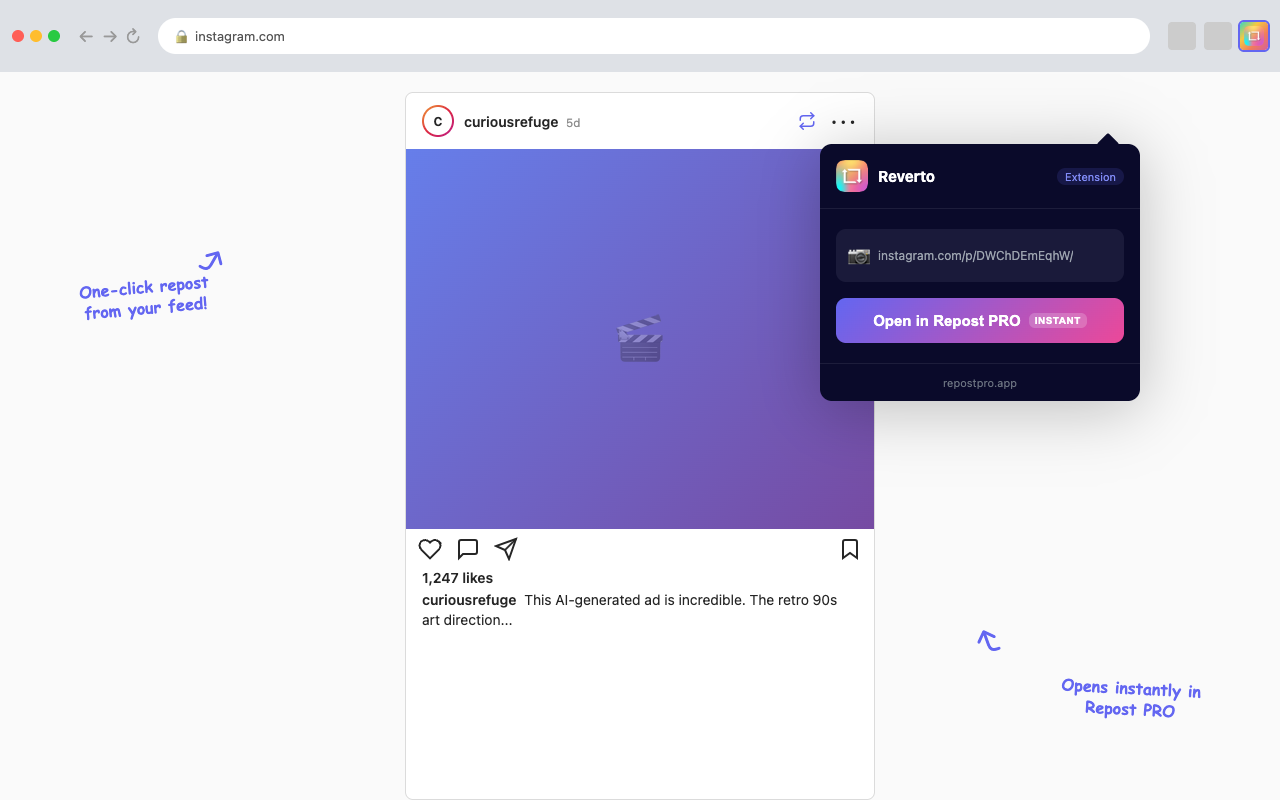
If you've ever browsed Instagram or TikTok on your computer and wished you could repost a photo, reel, or video with a single click, the Repost PRO Chrome extension is exactly what you need. It injects a repost button right inside the Instagram and TikTok feeds, so you never have to leave the page, copy links, or switch to another tool.
In this guide we'll cover what the extension does, how to install it, which browsers and operating systems it supports — including Chrome OS and Chromebooks — and how to get the most out of it.
What Is the Repost PRO Chrome Extension?
The Repost PRO extension is a lightweight browser add-on that integrates directly into instagram.com and tiktok.com. Once installed, a small repost button appears next to every post, reel, and TikTok video in your feed. Click it and the content is ready to be saved or shared — no extra tabs, no URL copying, no separate desktop app required.
Key features include:
- One-click repost — A repost button appears inline on every Instagram post, reel, and TikTok video.
- Instagram support — Works with feed posts, reels, carousels, and single post pages.
- TikTok support — Adds a repost button on TikTok feed videos.
- No new tabs — The extension connects directly to the Repost PRO web app, keeping everything seamless.
- Multilingual — Detects the Instagram UI language automatically (English, Italian, French, German, Spanish, Portuguese).
Which Browsers Are Supported?
The Repost PRO extension is built for the Chrome Web Store, but that doesn't mean it only works in Google Chrome. Any Chromium-based browser can install and run it:
- Google Chrome — Full native support.
- Microsoft Edge — Install directly from the Chrome Web Store or from the Edge Add-ons store.
- Brave — Full compatibility with Chrome extensions.
- Opera — Supports Chrome extensions via the built-in compatibility layer.
- Vivaldi — Full Chrome Web Store access.
If your browser is based on Chromium, it will run the Repost PRO extension without issues.
Using Repost PRO on Chrome OS & Chromebook
One of the biggest advantages of a Chrome extension for reposting is that it works natively on Chrome OS. If you own a Chromebook, you know that installing desktop apps isn't always straightforward — but Chrome extensions run out of the box.
Here's why Repost PRO is the ideal repost solution for Chrome OS users:
- No Android app needed — While Chromebooks can run Android apps, performance varies. The Chrome extension runs natively in the browser with zero overhead.
- Always up to date — The extension fetches its configuration from the server, so you always have the latest features without waiting for a store update.
- Lightweight — Chrome OS devices often have limited storage and RAM. The extension is just a few kilobytes and doesn't impact system performance.
- Offline-ready feed — Save posts while online and access them even when your Chromebook is offline.
How to Install on Chromebook
- Open Google Chrome on your Chromebook (it's the default browser).
- Open the Repost PRO extension page on the Chrome Web Store.
- Click Add to Chrome and confirm the installation.
- Navigate to instagram.com or tiktok.com — you'll see the repost button on every post.
That's it. No sideloading, no APK installs, no developer mode required.
How to Install the Extension on Desktop
Installing on Windows, macOS, or Linux is just as easy:
- Open your Chromium-based browser (Chrome, Edge, Brave, etc.).
- Install the Repost PRO Chrome extension from the Chrome Web Store.
- Click Add to Chrome → Add extension.
- Browse Instagram or TikTok as usual — the repost button will appear automatically.
For Microsoft Edge users: Edge can install extensions from both the Chrome Web Store and the Edge Add-ons marketplace. If prompted, just allow Chrome Web Store extensions in your Edge settings.
How It Works: Step by Step
Once the extension is installed, here's what happens when you browse social media:
On Instagram
- Open instagram.com and scroll through your feed.
- Next to the share and bookmark icons on each post, you'll see a Repost PRO button.
- Click it — the extension extracts the post URL and opens it in the Repost PRO web app.
- Download the photo, reel, or carousel, or share it directly.
On TikTok
- Open tiktok.com and browse the For You or Following feed.
- Each video will show a Repost PRO button alongside the native action buttons.
- Click it to save the video without watermark via the web app.
Extension vs. Web App vs. Mobile App: Which Should You Use?
Repost PRO is available as a Chrome extension, a web app, and a mobile app. Here's how they compare:
- Chrome extension — Best for desktop and Chromebook users who browse Instagram and TikTok in the browser. One-click repost without leaving the page.
- Web app — Best when you have a direct link to a post. Paste the URL at repostpro.app/webapp-online and download. Works on any browser, any device.
- Mobile app — Best for on-the-go reposting from your phone. Available on iOS, Android, and Windows.
All three options share the same Repost PRO account, so your subscription works everywhere.
Why Chrome OS Users Love the Extension
Chromebook users often face a frustrating gap: many social media tools are designed for phones or full desktops, not for Chrome OS. The Repost PRO extension fills that gap perfectly:
- No workarounds — No need to install the Android version, enable Linux apps, or use web workarounds.
- School and work Chromebooks — Extensions approved by IT administrators can be used on managed devices, making it accessible on school or company Chromebooks.
- Fast and battery-friendly — The extension uses minimal resources, which matters on low-power Chromebook hardware.
- Keyboard shortcuts — Navigate and repost without touching the trackpad.
Frequently Asked Questions
Does the extension work on Chrome OS and Chromebook?
Yes. Chrome OS supports all Chrome Web Store extensions natively. Install the Repost PRO extension on your Chromebook and repost Instagram and TikTok content directly from your browser without any additional apps.
Can I use it on Microsoft Edge or Brave?
Yes. Microsoft Edge, Brave, Opera, and any Chromium-based browser can install Chrome extensions. The Repost PRO extension works exactly the same across all these browsers.
Is the extension free?
The extension itself is free to install from the Chrome Web Store. It adds repost buttons directly inside Instagram and TikTok feeds. For unlimited downloads and premium features, a Repost PRO subscription starts at just $2.50/month with the annual plan.
Does it work on Firefox or Safari?
Not at this time. Firefox and Safari use different extension APIs. For those browsers, you can use the Repost PRO web app instead — just paste the post URL and download.
Is it safe to use?
Absolutely. The extension only activates on instagram.com and tiktok.com. It doesn't collect personal data, doesn't access your account credentials, and doesn't modify any content on the page other than adding the repost button.
Get the Repost PRO Chrome Extension
Add one-click Instagram & TikTok reposting to your browser — works on Chrome, Edge, Brave, and Chromebook
Add to Chrome — It's Free Try the Web App