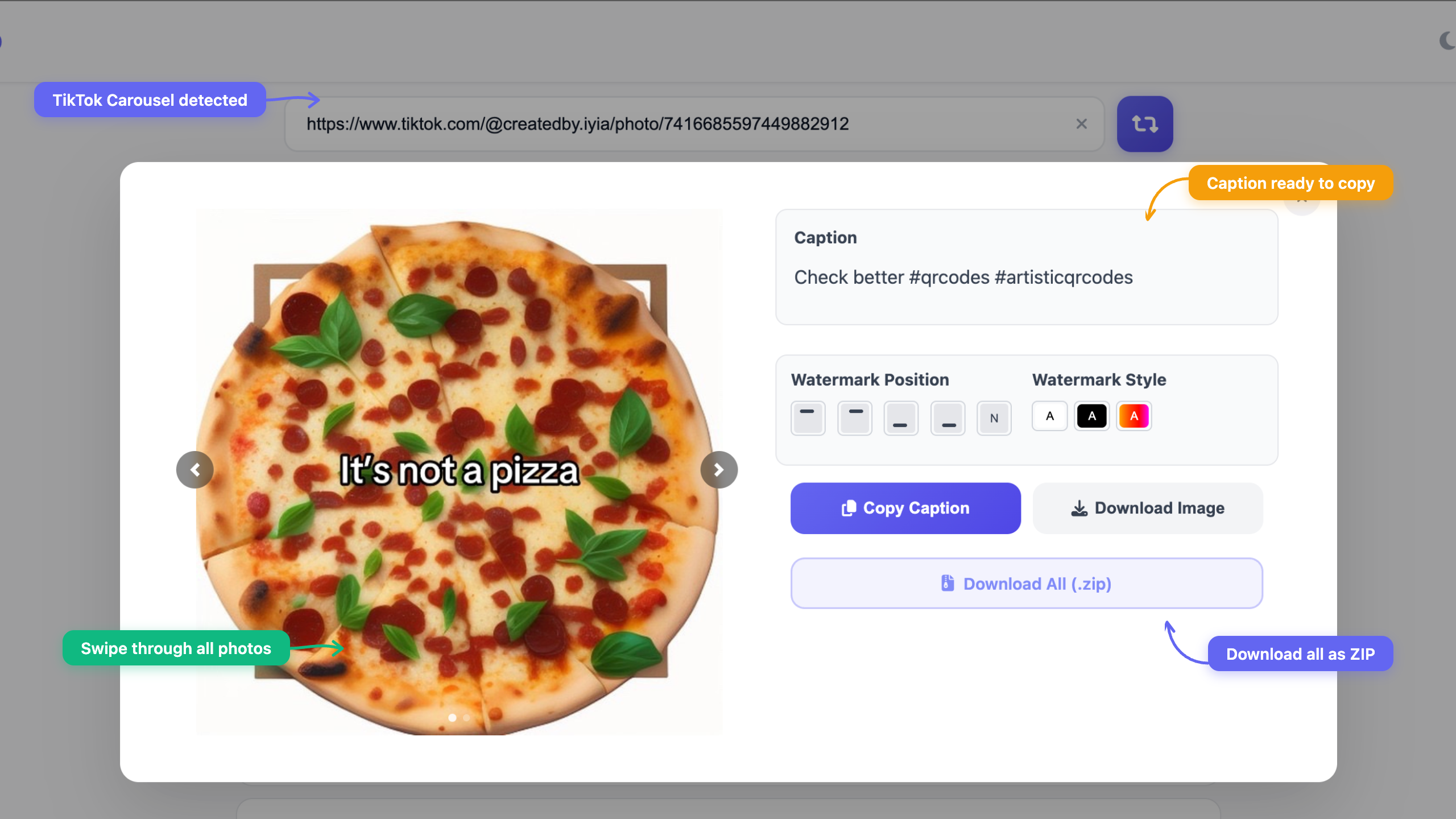
TikTok carousels — also called slideshows or photo posts — are everywhere. Creators use them for outfit dumps, recipe cards, memes, travel photos, and storytelling. But when you want to save those images to your phone or computer, TikTok doesn't make it easy.
With Repost PRO you can download every photo from a TikTok carousel in HD, without watermarks, in seconds. Here's how.
How to Download a TikTok Carousel
- Open the TikTok carousel you want to save.
- Tap Share → Copy link (or copy the URL from your browser).
- Go to repostpro.app/webapp-online.
- Paste the link and hit Go.
- Repost PRO detects the carousel and shows all images. Download them individually or all at once.
That's it. No account, no login, no app install needed.
What About Watermarks?
When you save a TikTok video through the app, TikTok adds its watermark. But TikTok carousel photos don't have a burned-in watermark the same way videos do. The images you download through Repost PRO are the original full-resolution photos uploaded by the creator — clean, no overlay, no TikTok branding.
What Is a TikTok Carousel Exactly?
A TikTok carousel (also called a slideshow or photo mode post) is a post with multiple images that viewers swipe through. It usually has background music. TikTok introduced this format to compete with Instagram carousels, and it's become hugely popular for:
- Photo dumps — multiple photos from an event or trip
- Tutorials — step-by-step guides with one step per slide
- Memes — multi-panel jokes and reaction images
- Recipes — ingredients and steps as individual cards
- Product showcases — multiple angles or variants
Why Not Just Screenshot?
You could screenshot each slide, but you'll get:
- Lower quality — screenshots capture your screen resolution, not the original image
- UI elements — the TikTok interface (buttons, caption, progress bar) gets captured too
- Cropped images — TikTok may crop or scale images to fit your screen
- One by one — tedious for carousels with 6, 8, or 10+ images
Repost PRO downloads the original uploaded files at full resolution, without any screen elements.
Works on Every Device
Repost PRO is a web app, so it works anywhere you have a browser:
- iPhone & Android — paste the link in Safari or Chrome
- Desktop — Windows, Mac, Linux, Chromebook
- Chrome Extension — install the Repost PRO extension and get a download button directly on TikTok
TikTok Carousel vs. TikTok Video
Both can be downloaded with Repost PRO, but they work differently:
- Carousel / Slideshow — downloads as individual HD images (or all at once as a ZIP). No watermark.
- Video — downloads as an MP4 file without the TikTok watermark. PRO users get HD quality.
Repost PRO automatically detects whether a TikTok link is a carousel or a video and handles it accordingly.
Can I Also Save Instagram Carousels?
Yes. Repost PRO supports both TikTok and Instagram carousels. Same process — paste the link, download all images. Check out our guide on how to repost Instagram carousels for more details.
Frequently Asked Questions
How do I download a TikTok carousel or slideshow?
Copy the TikTok carousel link, paste it into Repost PRO, and download all photos in HD. No watermark, no login required.
Can I download TikTok slideshows without watermark?
Yes. Repost PRO downloads the original high-resolution photos from TikTok carousels without any watermark or overlay.
Does it work with TikTok photo posts that have music?
Yes. Repost PRO downloads all the individual photos from the carousel. The music is part of the TikTok player, not the images themselves, so the photos are saved as clean HD images.
Can I download all images at once?
Yes. Repost PRO detects TikTok carousels automatically and lets you download all images at once as a ZIP file, or save them individually.
Is it free?
Yes, TikTok carousel downloads are free on Repost PRO. PRO users get unlimited downloads and additional features like HD video downloads.
Download TikTok Carousels in HD
Paste any TikTok carousel link and save all photos instantly — no watermark, no app needed
Try Repost PRO