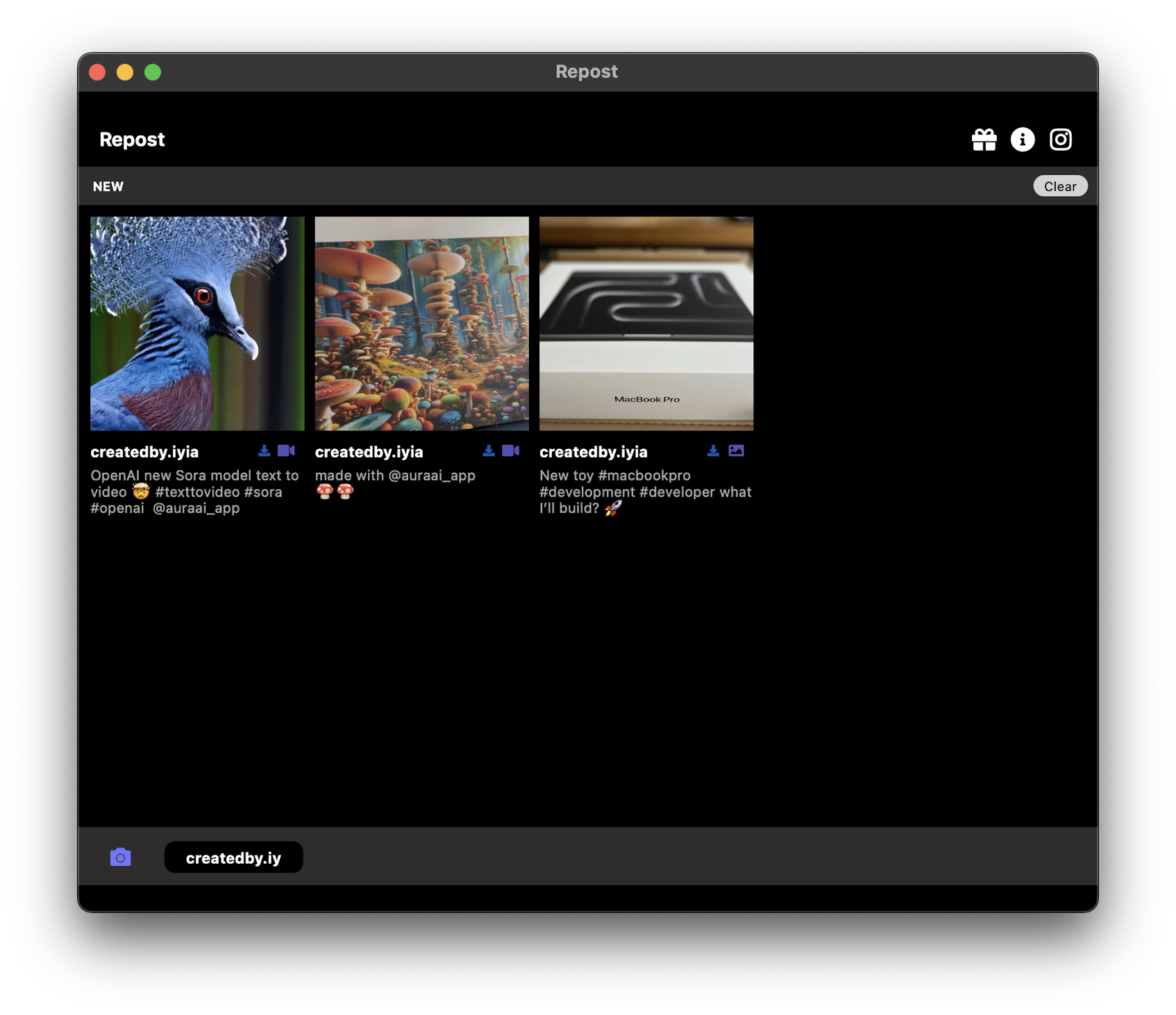
Whether you are a content creator curating an aesthetic feed, a social media manager scheduling reposts across multiple accounts, or a casual user who simply wants to save and reshare a friend's reel, the right repost app for Instagram can make all the difference. With dozens of options available in app stores and on the web, finding the one that actually delivers HD quality downloads, respects your privacy, and works across every device is harder than it should be.
New: Repost PRO now includes a free anonymous Instagram story viewer — watch any public account's stories without login and without leaving any trace.
We have spent the last nine years building and refining Reposted, the repost tool trusted by over two million users worldwide. In this guide we break down everything you need to know to choose the best repost app for Instagram in 2026, covering our dedicated apps for iPhone, Android, desktop, and the web, along with a detailed feature comparison so you can pick the platform that fits your workflow.
What Makes a Great Repost App?
Before diving into individual apps, it helps to understand the criteria that separate a truly great repost tool from the dozens of copycat apps that clutter the App Store and Google Play. Here are the key factors to evaluate when searching for the best repost app for Instagram.
Ease of Use
A repost app should be dead simple. The ideal workflow is: copy a link, open the app, and tap one button to save or reshare. If an app requires you to navigate complicated menus, watch ads on every screen, or jump through hoops just to download a single post, it is not worth your time. The best repost apps detect the copied link automatically and load the content within seconds.
HD Quality Downloads
There is nothing worse than reposting a beautiful photo only to discover it has been compressed into a blurry mess. A top-tier repost app saves content in its original resolution, whether that is a 1080p reel, a high-resolution carousel image, or a crisp story video. Quality matters, especially if you are a brand or creator whose reputation depends on visual presentation.
No Watermarks
Many free repost apps stamp their logo on every image and video you save. This looks unprofessional and can hurt engagement when you reshare content. The best Instagram repost app lets you download clean, watermark-free files so your reposts look exactly like the originals.
Caption and Hashtag Copying
Captions provide context, credit, and hashtags that drive discovery. A good repost app copies the original caption automatically, making it easy to paste it into your new post and give proper credit to the original creator. This feature alone can save you minutes on every repost.
Multi-Platform Support
Your content workflow does not happen on just one device. Maybe you browse Instagram on your iPhone during your commute, but you edit and schedule posts on your MacBook at your desk. The best repost tools work across iOS, Android, Windows, Mac, Linux, and even the web so you can repost from anywhere.
No Login Required
Privacy should not be a luxury. The safest repost apps never ask for your Instagram or TikTok credentials. You should be able to use every feature without handing over your username and password. This protects your account from phishing risks and keeps your data private.
Free Tier with Real Value
A repost app should offer meaningful functionality for free. While premium tiers may unlock batch downloads or extra features, the core repost workflow of copying a link, downloading content, and resharing it should be available at no cost.
Best Repost App for iPhone (iOS) – Reverto PRO
Reverto PRO is our dedicated repost app for iPhone, designed from the ground up for the iOS ecosystem. It takes full advantage of native iOS features like the Share Sheet, Shortcuts integration, and iCloud sync to deliver the fastest repost experience on any Apple device — including iPhone, iPad, and ready for the upcoming iPhone Fold with a native master-detail layout inherited from the iPad build.
Key Features
- Instant Share Sheet integration – Tap the share button inside Instagram or TikTok, choose Reverto PRO, and the content loads instantly. No need to copy and paste links manually.
- HD downloads – Save Instagram posts, reels, stories, highlights, and carousels in their full original quality up to 1080p.
- TikTok support – Download TikTok videos without the watermark, keeping your reposts clean and professional.
- Auto caption copy – The original caption, hashtags, and mentions are copied to your clipboard automatically so you can paste them when reposting.
- No login required – Reverto PRO never asks for your Instagram or TikTok password. Your account stays safe.
- Carousel support – Save every slide from a multi-image post in a single tap, not just the first photo.
- Built-in repost scheduling – Plan your reposts in advance and let the app remind you when it is time to post.
How to Repost with Reverto PRO on iPhone
- Open Instagram and find the post, reel, or story you want to repost.
- Tap the three-dot menu (or the share arrow) and select Copy Link.
- Open Reverto PRO. The app detects the link automatically and loads the content.
- Tap Save to Camera Roll or Repost to Instagram.
- The caption is already on your clipboard, so just paste it when you create your new post.
Reverto PRO is available as a free download on the App Store with an optional premium upgrade for power users who want batch downloads and ad-free usage.
Download Reverto PRO for iPhone
Best Repost App for Android – Reshare PRO
Reshare PRO is our purpose-built repost app for Android, optimized for the wide variety of devices in the Android ecosystem. Whether you are using a Samsung Galaxy, Google Pixel, OnePlus, a foldable phone like the Samsung Galaxy Z Fold or Pixel Fold, or any other Android device, Reshare PRO delivers a consistent, fast, and reliable repost experience — with a native master-detail layout for foldable and tablet screens.
Key Features
- Direct Share integration – Share content from Instagram or TikTok directly into Reshare PRO using the Android share menu. One tap, no link copying needed.
- Full HD quality – Save videos and images at their maximum available resolution, preserving every detail.
- TikTok without watermark – Download TikTok videos clean, with the watermark automatically removed.
- Caption and hashtag copying – Original captions are captured and ready to paste when you create your repost.
- No account login – Works entirely through public links. Your Instagram and TikTok credentials are never stored or transmitted.
- Story and highlight downloads – Save ephemeral stories and permanent highlights before they disappear.
- Lightweight and fast – Minimal battery and storage impact, even on older devices.
How to Repost with Reshare PRO on Android
- Open Instagram or TikTok and navigate to the content you want to repost.
- Tap the share icon and choose Copy Link, or tap Share to and select Reshare PRO directly.
- Reshare PRO opens with the content already loaded.
- Tap Download to save it to your gallery, or tap Repost to share it directly to your Instagram feed or story.
- Paste the original caption when composing your new post to give credit.
Reshare PRO is free to download on Google Play, with an optional premium subscription for advanced features like batch downloading and an ad-free experience.
Download Reshare PRO for Android
Best Repost App for Desktop (Windows, Mac, Linux)
If you manage social media accounts professionally or prefer working from your computer, our desktop repost app is built for you. Available on Windows, macOS, and Linux, the Reposted desktop application brings powerful features that are simply not possible on mobile.
Key Features
- Batch downloading – Paste multiple Instagram and TikTok links at once and download them all simultaneously. Perfect for content managers who need to save dozens of posts in a single session.
- Original quality files – Every download preserves the original resolution and file quality with no re-encoding or compression.
- Organized output folders – Automatically organize downloaded files by date, account, or content type so your media library stays tidy.
- Keyboard shortcuts – Speed up your workflow with shortcuts for paste, download, and open-in-folder actions.
- Cross-platform support – The same app runs on Windows 10 and 11, macOS (including Apple Silicon M-series Macs), and popular Linux distributions.
- No login, no tracking – Just like our mobile apps, the desktop version never asks for your social media credentials.
- Drag-and-drop support – Drag downloaded files directly into your video editor, scheduler, or design tool.
Who Is the Desktop App For?
The desktop app is ideal for social media managers handling multiple client accounts, content creators who edit reposts in desktop software like Adobe Premiere or Final Cut Pro, and marketing teams that need to archive competitor content or curate inspiration boards. The batch download feature alone can save hours every week compared to downloading posts one by one on your phone.
Download Reposted for Windows, Mac, or Linux
Best Online Repost Tool (No App Required)
Not everyone wants to install an app, and sometimes you just need to grab a single post quickly. That is exactly what our online repost tool is designed for. It works directly in your web browser, on any device, with no downloads or sign-ups required.
How It Works
- Open the Reposted web tool in any browser (Chrome, Safari, Firefox, Edge, or any other).
- Paste the Instagram or TikTok link into the input field.
- Click Download and the content is saved directly to your device.
Why Use the Web Tool?
- No installation – Works instantly in your browser. Perfect for one-off downloads or when you are on a borrowed device.
- Works everywhere – Any device with a web browser can use it: Chromebook, tablet, smart TV browser, or your desktop.
- HD quality – Same high-quality downloads as our native apps, with no compression or watermarks.
- Completely free – No account, no subscription, no hidden fees. Just paste a link and download.
- Privacy-first – No cookies, no tracking, no login. The web tool processes links on the fly and does not store your data.
The web tool is the perfect complement to our native apps. Use the apps for your daily workflow and the web tool for those moments when you need a quick download without switching apps.
Try the Online Repost Tool Now
Ready to Start Reposting?
Download the most trusted Instagram and TikTok repost app, or use the free web tool
Download NowFeature Comparison Table
Here is a side-by-side comparison of every Reposted platform so you can pick the one that fits your needs. All four options are built by the same team, so you get the same reliability and quality everywhere.
| Feature | Reverto PRO (iOS) | Reshare PRO (Android) | Desktop App | Web Tool |
|---|---|---|---|---|
| Instagram Posts | ✓ | ✓ | ✓ | ✓ |
| Instagram Reels | ✓ | ✓ | ✓ | ✓ |
| Instagram Stories | ✓ | ✓ | ✓ | ✓ |
| Instagram Highlights | ✓ | ✓ | ✓ | ✓ |
| Carousels (All Slides) | ✓ | ✓ | ✓ | ✓ |
| TikTok Videos | ✓ | ✓ | ✓ | ✓ |
| HD Quality | ✓ | ✓ | ✓ | ✓ |
| No Watermark | ✓ | ✓ | ✓ | ✓ |
| Copy Captions | ✓ | ✓ | ✓ | – |
| Batch Download | – | – | ✓ | – |
| No Login Required | ✓ | ✓ | ✓ | ✓ |
| Price | Free (Premium optional) | Free (Premium optional) | Free (Premium optional) | 100% Free |
How to Repost Instagram Posts with Our App
Regardless of which platform you choose, the core repost workflow is the same everywhere. Here is a quick step-by-step that works across all our apps and the web tool.
Step 1: Copy the Link
Open Instagram (or TikTok) and navigate to the post, reel, story, or highlight you want to repost. Tap the three-dot menu or the share arrow and select Copy Link. The link is now on your clipboard.
Step 2: Open Reposted
Launch the Reposted app on your phone or desktop, or open the web tool in your browser. On mobile, the app usually detects the copied link automatically and loads the content. On desktop and web, paste the link into the input field.
Step 3: Download or Repost
Tap Download to save the content to your device, or tap Repost to share it directly to your Instagram feed or story. On desktop, the file is saved to your chosen output folder. On the web, the browser downloads the file to your default downloads directory.
Step 4: Give Credit
The caption and original username are copied to your clipboard. When you create your new post, paste the caption and tag the original creator. Giving credit is not just good manners; it builds community and trust.
For a more detailed walkthrough with screenshots and tips, read our full guide: How to Repost on Instagram.
Why Choose Reposted Over Other Repost Apps?
The app stores are full of repost apps, so why should you pick Reposted? Here is what sets us apart from the competition after nine years of continuous development.
Trusted by 2M+ Users for 9+ Years
Reposted is not a fly-by-night app that appeared last month. We have been building repost tools since 2017, and over two million users trust us to handle their content. Our apps have processed more than 50 million reposts worldwide. That kind of track record means we have seen and solved every edge case, from carousel glitches to reel resolution issues.
No Login Required – Your Privacy Matters
Many repost apps ask you to sign in with your Instagram or TikTok account. This is a significant security risk. If that third-party app gets hacked or misuses your credentials, your social media accounts are compromised. Reposted works entirely through public links. We never ask for your password, and we never access your account data. Your privacy is non-negotiable.
Multi-Platform – One App Everywhere
Most repost apps only work on one platform. With Reposted, you get a native app for iPhone, a native app for Android, a powerful desktop app for Windows, Mac, and Linux, and a web tool that works in any browser. No matter where you work, Reposted is there. And because all platforms are built by the same team, you get a consistent experience everywhere.
HD Quality, No Watermarks
We never compress your downloads, and we never stamp our logo on your files. What you save is exactly what the original creator posted, at full resolution. This makes Reposted the best repost app for Instagram for professionals who cannot afford to share low-quality content.
Active Development and Support
Instagram and TikTok change their platforms frequently, and repost tools need to keep up. Our team ships updates regularly to ensure compatibility, and our support page is always available if you run into issues. When other repost apps break after an Instagram update, Reposted is usually the first to push a fix.
Frequently Asked Questions
Is the repost app free?
Yes. All Reposted apps (iOS, Android, desktop) are free to download and use. The core repost functionality, including HD downloads, caption copying, and reposting to Instagram, is available at no cost. We offer an optional premium subscription that unlocks advanced features like batch downloading and an ad-free experience, but you can absolutely use the app for free. The web tool is completely free with no premium tier at all.
Does it work with TikTok?
Yes. Reposted supports both Instagram and TikTok across all platforms. You can download TikTok videos without the watermark, save TikTok photos, and repost TikTok content just as easily as Instagram content. Simply copy the TikTok link and paste it into the app or the web tool.
Do I need to log in with my Instagram account?
No. Reposted never asks for your Instagram or TikTok username or password. The app works entirely through public links, which means your social media accounts remain completely private and secure. This is a core design principle that we will never change.
Can I repost Instagram stories and highlights?
Yes. Our apps support all Instagram content types, including regular posts, reels, stories, highlights, and carousels. For a detailed tutorial on highlights, check out our guide: How to Repost Highlights on Instagram.
Is it legal to repost someone else's content?
Reposting is generally acceptable when you give proper credit to the original creator by tagging them and including their caption. However, always respect copyright and ask permission when reposting commercial or professional content. Our app makes it easy to copy the original caption and username so you can credit the creator every time.
Which platforms are supported?
Reposted is available on iPhone (iOS), Android, Windows, macOS (including Apple Silicon M-series), Linux, and the web. No matter what device you use, there is a version of Reposted built for it.
Have more questions? Visit our comprehensive FAQ page for detailed answers to the most common questions about reposting from Instagram and TikTok.
Download the Best Repost App Today
Join 2 million+ users who trust Reposted for Instagram and TikTok content
Free Download